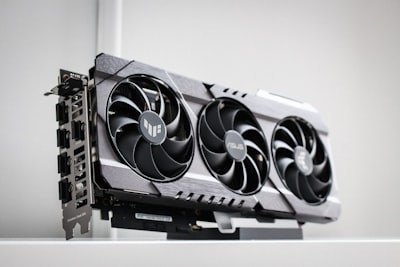
In the video game industry, optimization seems to have become a pending issue. Recent titles require state-of-the-art hardware to achieve stable frame rates, making graphics cards obsolete that just a few years ago were benchmarks. However, a growing trend allows the useful life of these GPUs to be extended through techniques such as frame generation implemented by third parties. This article explores how an older GTX 1060 can be converted into a dedicated frame gen card, freeing up the main GPU and improving overall performance. We'll address technical context, practical configuration, and business implications, connecting with bespoke application solutions that optimize hardware resources.
Frame generation is an advanced technique that uses artificial intelligence to interpolate frames between two rendered frames, doubling the frame rate (FPS) without increasing the load on the main GPU. NVIDIA introduced this functionality with DLSS 3 in its RTX 40 series, and AMD has Fluid Motion Frames in the RX 7000. However, third-party software such as Lossless Scaling or LSFrameGen (LSFG) has democratized access: they work on any GPU, including older GTX 1060, GTX 1080, or even previous-generation AMD cards.
The GTX 1060, released in 2016, is still a capable card for 1080p gaming at medium settings. Its main limitation lies in the lack of dedicated hardware to accelerate neural networks, which makes native frame generation unfeasible. However, by using it as a secondary GPU exclusively to run the interpellation process, the load can be offloaded from the main card (for example, an RTX 2060 or an RX 5700). The key is to assign the GTX 1060 to the frame gen software while the main GPU handles rendering.
The physical setup requires a motherboard with two PCIe x16 slots (at least in x8 mode) and a power supply that supports both cards. There is no need to connect a monitor to the GTX 1060; it is enough that it is present in the system. Frame gen software, such as LSFG, allows you to select which GPU to use for the process. On Windows systems, it is possible to assign applications to specific GPUs from the advanced graphics settings. This approach reduces the bottleneck and allows a modest GPU (the GTX 1060) to handle frame generation, while the main one concentrates on rasterization and shaders.
The results can be surprising. In games where the main GPU struggles to maintain 60 FPS, adding the GTX 1060 as a dedicated frame gen card can raise the stable rate to 90 or 120 FPS, with minimal additional latency if the software is well optimized. This extends the life of hardware that would otherwise be discarded, offering an economical solution to buying a new GPU.
From a business perspective, this practice illustrates a fundamental principle: the intelligent use of resources. Many companies have old graphics card parks that could be repurposed for specialized tasks, such as video processing, AI model inference, or server workload acceleration. Q2BSTUDIO, as a custom software development company, helps to integrate these types of heterogeneous configurations into corporate environments. Its custom application services allow you to design solutions that automatically detect available resources and assign tasks dynamically, maximizing efficiency.
In addition, artificial intelligence plays a growing role in hardware optimization. AI agents can monitor GPU usage and decide in real-time which processes to run on each one, reducing power consumption and improving the user experience. This adaptability is especially valuable in environments where multiple workloads are handled, such as 3D rendering, data analysis, or simulations. Q2BSTUDIO offers enterprise AI that integrates with AWS and Azure cloud services, allowing these hybrid configurations to scale to the cloud.
However, configuring a dedicated frame gen GPU is not without its challenges. The additional latency can be noticeable in competitive games, although solutions such as LSFG incorporate low-latency modes. Also, compatibility with certain titles can be spotty. Therefore, it is advisable to test it in a controlled environment before deploying it to a production system. In the business field, proofs of concept Q2BSTUDIO carried out to ensure that the integration of custom software does not introduce vulnerabilities; Cybersecurity is a fundamental pillar in any technological solution, and the company offers pentesting services to validate the security of these architectures.
The reuse of old hardware also impacts sustainability. In a context where planned obsolescence is questioned, extending the life of GPUs reduces electronic waste. Companies that adopt this approach can improve their corporate image and comply with environmental regulations. Q2BSTUDIO complements this vision with Business Intelligence services based on Power BI that analyze performance and consumption metrics, helping to make informed decisions about equipment renewal.
To implement a frame gen solution with GTX 1060, it is recommended to follow these steps: 1) Verify that the motherboard has two PCIe slots and sufficient physical space. 2) Install the GTX 1060 without connecting a monitor to it; the system will detect it as an additional GPU. 3) Download and install third-party frame gen software (e.g., LSFG). 4) Configure the application to use the GTX 1060 as a frame generation device. 5) Adjust the game's graphics settings so that the main GPU performs the rendering. 6) Test on multiple titles to gauge latency and visual quality.
It's important to note that not all games benefit equally. Titles with a lot of CPU load may not see significant improvements, while those limited by GPUs experience the biggest jumps. The GTX 1060, with its Pascal architecture, offers a good balance between consumption and performance for this task, although more powerful cards such as the GTX 1070 or GTX 1080 would give even better results. The community has documented gains of up to 70% in FPS in games such as Cyberpunk 2077 or Red Dead Redemption 2 with proper settings.
Looking to the future, the evolution of AI agents will allow the assignment of tasks between multiple GPUs to be fully automated. Q2BSTUDIO works on developing custom applications that use reinforcement learning to dynamically optimize load sharing, even in hybrid cloud environments with AWS and Azure cloud services. This applies not only to games, but to any graphics-intensive process: scientific simulations, video editing, architectural rendering, or training AI models.
In conclusion, don't throw away your old GTX 1060. With a little engineering and the right custom software , it can become a valuable ally in improving performance in games and professional applications. The key is to think beyond conventional use and explore combinations that maximize hardware investment. Companies like Q2BSTUDIO are at the forefront of this philosophy, offering customized solutions that integrate everything from physical configuration to monitoring with power BI. If you're looking to extend the life of your equipment or reuse resources wisely, reach out to experts who understand both custom hardware and software.