When we talk about the most basic but essential tool for any professional who spends hours in front of a screen, the keyboard is usually that underrated element. However, those who have had to write long reports, debug code until the wee hours of the morning, or compete in eSports tournaments know well that the difference between a mechanical keyboard and a membrane keyboard goes far beyond the noise when typing. This comparative guide not only seeks to break down the technical aspects, but to offer a professional perspective that helps make informed decisions, whether for a job, a data center or a digital transformation project.
To understand the background of this dilemma, it is worth remembering that keyboard technology has not evolved in a linear way. While mechanical keyboards dominated the era of typewriters and the first personal computers, membrane keyboards burst onto the scene in the 1990s thanks to their low cost and slim design. Today, the balance is again tipping towards the mechanical in certain areas, but the membrane is still the predominant choice in corporate environments for reasons of budget and ergonomics. Let's analyze both worlds from a technical and business perspective.
Internal architecture: two contact philosophies
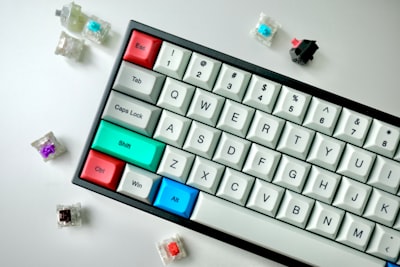
On a mechanical keyboard, each key has its own independent switch: a mechanism consisting of a spring, a stem, and metal contacts. When pressed, the stem descends, compresses the spring, and closes an electrical circuit. The key is that there are multiple types of switches – linear, tactile and clickable – that modify the sensation, the force needed and the sound. A programmer may prefer a touch switch to feel the exact actuation point, while a shooter player may opt for a linear for fast and smooth presses.
On the other hand, a membrane keypad works by means of three flexible layers: an upper one with conductive traces, a separator with holes and a lower one that is also conductive. When you press the key, the top layer deforms and goes through the hole, making contact with the bottom layer. There are no individual mechanical components, which gives a softer feel, often described as 'mushy' or rubbery. The absence of a defined point of action can cause greater fatigue in long writing sessions, although its silence and lightness are noticeable in open offices.
Durability and cost: the business equation
From an investment perspective, mechanical keyboards offer a lifespan that can exceed 50 million keystrokes per switch, even reaching 100 million in high-end models. Well maintained—cleaning dust and lubricating switches—they can last for decades. An employee can use the same mechanical keyboard for their entire career. Membrane barrels, on the other hand, are designed to withstand between 5 and 10 million pulses, which in intensive use is equivalent to about 2-5 years before the sensation degrades significantly. For a company with hundreds of seats, changing keyboards every few years can be a non-negligible recurring expense. However, the initial cost of a mechanical keyboard is three to four times higher, so the decision should be based on the long-term return on investment.
This is where the digitalization of processes comes into play. Many companies that have adopted process automation solutions realize that the productivity of their technical teams depends on both software and hardware. An improper keyboard can lead to repetitive strain micro-injuries and reduced performance. That's why, when planning a workstation, you don't just have to think about the chair or the monitor: the keyboard is a direct interface to the machine that deserves analysis.
Types of Mechanical Switches: Beyond Marketing
The ecosystem of mechanical switches is immense. Brands such as Cherry, Gateron, Kailh or Outemu offer variants that are classified into three large families:
Linear (such as Cherry MX Red): They offer a smooth, continuous pulsation, without tactile feedback or sound. They are ideal for games where speed and multiple presses are required without additional resistance. They are also popular with heavy writers because they avoid touch fatigue, although some users miss confirmation of the exact point.
Tactile (such as Cherry MX Brown): They have a small highlight right at the point of action, which we notice when pressing. That tap indicates that the key has registered without the need to reach the bottom. They are the all-rounder par excellence: they work well for both writing and playing, and are especially useful in programming or text editing where accuracy is key.
Clickable (such as Cherry MX Blue): In addition to the tactile enhancement, they produce an audible click similar to that of a classic typewriter. They satisfy writing lovers who are looking for sound feedback, but they can be annoying in shared offices or during video calls. For home use or in environments where noise is not an issue, they are a very rewarding choice.
The ergonomic factor and occupational health
More and more companies are concerned about the musculoskeletal health of their employees. A mechanical keyboard allows you to customize the actuation force and travel, which can reduce strain on your fingers and wrists. Some models include integrated wrist rests or are compatible with adjustable supports. However, membrane keyboards are usually flatter and lighter, making it easier for digital nomads to carry around. The key is to test both technologies before deciding. However, in environments where large volumes of data are handled or business intelligence services are used with Power BI, speed and accuracy when writing queries or reports can make all the difference. A keyboard that doesn't offer tactile feedback can lead to errors that then require double checking, wasting valuable time.
Improved membrane: scissor-switch and butterfly
Not all the membrane is the same. Laptop keyboards usually incorporate scissor-switch or butterfly mechanisms that, although based on flexible layers, add a mechanical structure to stabilize the key and improve travel. These designs offer a sharper experience than the classic membrane, but still fall short of the durability and customization of mechanics. They are the majority choice in ultra-thin devices and represent a compromise between portability and feel when writing. In fact, most professionals who work with laptops use this type without knowing it. If you want to explore specific models of laptop keyboards, you can visit interactive simulators that recreate them in 3D, a useful tool for comparing layouts without having the physical device.
What to choose according to the professional profile?
Developers and programmers: They tend to prefer touch switches (Brown or similar) because they need to feel every keystroke without going all the way, reducing noise and fatigue on long days of coding. Many opt for programmable backlit keyboards for low-light environments. Data analysts and BI users: Accuracy when writing numbers and formulas is vital. A linear or tactile mechanical keyboard can help minimize errors. Also, if they work with AI for businesses or AI agents that require fast data ingestion, typing speed becomes important. Gamers: Linear (Network) switches are kings in fast-paced games, while touch-based switches have their audience in strategy or MMO games. The ability to change keys and customize the response is a plus. Administrative and office automation staff: Here the membrane or silent switches (such as Cherry MX Silent) may be more appropriate so as not to interrupt colleagues. The economic factor also weighs heavily: in large deployments, the investment in mechanics may not be justified if the use is not intensive.Maintenance and cleaning: an undervalued aspect
A mechanical keyboard can be disassembled, cleaned, and even lubricated to extend their life. Keycaps are easily removed to be washed with soapy water. On the other hand, a membrane keyboard is usually a sealed piece; If liquid or dust gets in, it is difficult to repair and often needs to be replaced. In industrial or laboratory environments, spill resistance can be a deciding factor. Companies that implement custom application solutions for quality control or harsh environments often opt for mechanical keyboards with IP protection, although the cost skyrockets.
The impact on productivity: studies and anecdotes
Studies indicate that mechanical keyboards can increase typing speed by 5% to 10% in trained users, thanks to tactile feedback and reduced keystroke errors. It's not all black and white, though: a user accustomed to the membrane may feel uncomfortable at first with the increased resistance of some switches. The adaptation usually lasts one or two weeks. From a business perspective, if your team is made up of people who write extensive reports or develop software on a daily basis, it might be worth piloting with mechanics and measuring satisfaction.
Beyond the keyboard: the digital ecosystem
Today, the digital transformation of companies is not only about software, but also about how employees interact with technology. A keyboard is one more piece in a puzzle that includes monitors, ergonomic chairs and, of course, cloud infrastructure. At Q2BSTUDIO we know that offering cloud services, aws, and azure allows companies to scale their operations; But that scaling also depends on the well-being of talent. A developer who types comfortably produces better code. An analyst who does not fatigue writes more accurate queries.
In addition, cybersecurity is another layer to consider: in environments where sensitive data is handled, keyboards with secure hardware (such as those that encrypt keystrokes or use protected wireless connections) are increasingly in demand. In the end, the choice between mechanical and membrane is just one element of a broader strategy that includes everything from ergonomics to process automation with artificial intelligence.
Conclusion: an informed and contextual decision
There is no universally superior keyboard. The decision should be based on the intended use, budget, work environment, and personal preferences. Mechanical keyboards offer durability, customization, and better feedback, but they're more expensive and noisy. Membrane masks are inexpensive, quiet and light, but less durable and with a less precise feel. For a professional looking to maximize their productivity, the investment in a good mechanical keyboard usually pays for itself quickly. For a company that equips a hundred basic office automation workstations, the membrane is still the logical choice.
In any case, technology is advancing and manufacturers are developing hybrids that combine the best of both worlds: membranes with improved tactile sensation or silent mechanical switches. The important thing is to test, compare and not underestimate the impact that such an everyday item has on our health and efficiency. Whether you work with artificial intelligence, develop custom software , or manage dashboards in Power BI, your keyboard is the bridge between your mind and the machine. Choose it wisely.