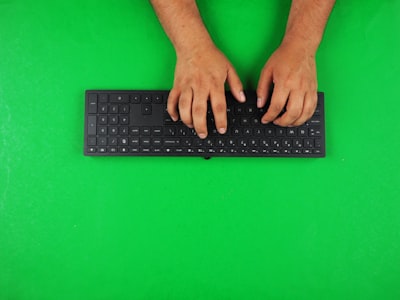
Typing is a fundamental skill in the digital world, but spending hours in front of the keyboard without proper technique can become a trap for the health of your hands and wrists. Beyond speed, correct finger placement and ergonomic posture are the basis for preventing repetitive strain injuries such as carpal tunnel syndrome, tendonitis or epicondylitis. In this article, we'll explore the essential principles of ergonomics when typing, how to correct bad habits, and how today's technology solutions – from custom apps to AI-based systems – can help protect your hands in the long run.
The Integral Posture: More Than Just Your Hands
Before focusing on the fingers, it is essential to understand that ergonomics when typing starts from the floor. Your feet should be flat on the floor or on a footrest, with your knees forming an angle of about 90 degrees. The back should be supported against the back of the chair, maintaining the natural curves of the spine. Your elbows should be in a 90- to 100-degree range, with your forearms parallel to the floor. Your wrists, on the other hand, should remain straight and slightly elevated above the desk, without leaning on them while you write. This position prevents carpal tunnel compression that occurs when the wrists bend upward (dorsiflexion) when resting on them. The screen should be placed at eye level, at a distance of 50 to 70 centimeters, and the shoulders should be relaxed, not shrunken. Adjusting these parameters is the first step towards healthy typing.
The most common mistake: supporting the wrists
Resting your wrists on the edge of your desk or on a wrist rest while typing is perhaps the most widespread ergonomic mistake. Although it may seem comfortable, it causes the wrists to bend upwards when reaching the keys, compressing the carpal tunnel. After thousands of repetitions daily, this pressure can trigger numbness, tingling, and pain. The rule of thumb is: your wrists should float freely above the keyboard during active typing. You should only support them during breaks. To achieve this, it is key to adjust the height of the keyboard and chair so that the forearms are parallel to the floor.
Precise finger placement: the base row technique
Your fingers should be slightly curved, as if you were holding a tennis ball, never extended or flat. The fingertips—not the flat face of the finger—are the ones that make contact with the keys. The hand rests on the base row: A, S, D, F for the left and J, K, L, Ñ (or semicolon) for the right. The index fingers have guide keys (F and J) with a tactile relief that allows you to position yourself without looking. Each finger is responsible for the keys on its spine and is immediately returned to the base row after each keystroke. The pressure must be minimal, only what is necessary to operate the key. The thumbs alternate to press the space bar, using the dominant or alternating as preferred. Mastering this technique not only increases speed, but distributes muscle load evenly, reducing fatigue.
Digital tools to train technique
Practice makes perfect, but practicing with bad habits reinforces injuries. That's why more and more professionals and companies are turning to bespoke software solutions that incorporate real-time hand animations, visual feedback, and precision analysis. Q2BSTUDIO, as a software and technology development company, creates tools that allow you to visualize the correct placement of your fingers while typing, comparing your movements to an ideal model. This immediate feedback is key to correcting postural deviations before they become lesions. In addition, apps can record metrics such as heart rate, wrist deviation, and pause times, offering customized reports that help improve ergonomics on a day-to-day basis.
Active breaks: the 20-20-20-20 rule
Even with the perfect technique, the body needs rest. The 20-20-20-20 rule is a simple and effective method: Every 20 minutes, take a 20-second break, look at something from 20 feet away, and gently stretch your fingers and wrists for 20 seconds. This habit reduces the tension accumulated in the extensor and flexor muscles, improves circulation and prevents stiffness. To remind yourself, you can use timers or apps that integrate reminders. Some AWS and Azure cloud service systems allow you to synchronize these reminders across corporate devices, ensuring that all employees maintain regular breaks, and the aggregated data can be analyzed with Power BI to identify patterns of fatigue in work teams.
Beyond the keyboard: technology for occupational health
The prevention of typing injuries is not limited to individual posture. Organizations can implement comprehensive occupational health platforms that monitor ergonomics on an ongoing basis. This is where artificial intelligence and AI agents play a transformative role. An AI-based system can analyze videos of employee posture, detect wrist deviations or neck tilt, and provide real-time recommendations. Q2BSTUDIO develops AI solutions for companies that, combined with business intelligence services, enable HR and occupational risk prevention managers to make data-driven decisions. For example, a dashboard in Power BI can show which teams have the highest incidence of poor posture, facilitating early intervention. In addition, cybersecurity is a critical aspect when handling employee biometric data; Q2BSTUDIO solutions include encryption protocols and secure access to comply with regulations such as GDPR.
The role of automation and intelligent agents
Imagine a virtual assistant that, using AI agents, guides you through the day: it reminds you to adjust the chair, to straighten your wrists when it detects that you are resting on them, or to perform periodic stretches. These agents can be integrated into any workflow, whether it's on an office computer or a mobile device. Process automation, another of Q2BSTUDIO's key services, allows these routines to be activated without manual intervention, freeing the user from the burden of remembering every detail. Thus, technology not only improves efficiency, but also takes care of people's health.
Conclusion: an investment in your well-being
Correct finger placement and ergonomics when typing are not a luxury, but a necessity in a world where we spend hours in front of screens. Adopting an appropriate posture, training the technique with digital tools and taking advantage of the technological solutions offered by a company like Q2BSTUDIO – specialized in the development of artificial intelligence and personalized applications – can make the difference between a productive professional career and one marked by chronic pain. Investing in ergonomics is investing in your most valuable asset: your health. Start today by adjusting your chair, keep your wrists floating, and let technology accompany you on the path to safer, more efficient typing.