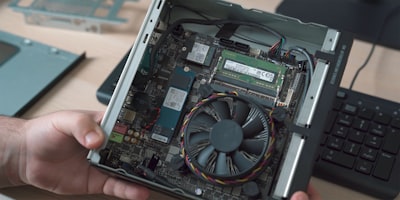
Mini PCs have evolved beyond simple office terminals into versatile computing hubs that manage everything from home labs to media centers. However, their full potential is only realized when you understand the real upgrade possibilities. This guide explores how to extend the lifespan of a mini PC through key upgrades: RAM, storage, wireless connectivity, and external graphics, all from a technical and business perspective that resonates with developers and companies looking to optimize hardware investments.
Before diving into each component, it is important to note that not all mini PCs offer the same degree of customization. Ultra-slim models often have soldered RAM and limited access to M.2 slots. In contrast, modular designs allow intervention with basic tools in just a few minutes. Knowing these differences at the time of purchase avoids frustration and aligns expectations with technical reality. At Q2BSTUDIO, as a software and technology development company, we know that well-dimensioned hardware is the foundation for building robust solutions, both for cloud environments and local systems.
Upgrading RAM: the first step toward performance
RAM is undoubtedly the most cost-effective upgrade. Modern mini PCs use DDR5 SO-DIMM modules, easily replaceable if the manufacturer has chosen sockets instead of soldered memory. The key is to verify the maximum capacity supported by the motherboard: if the manufacturer states 64 GB, inserting 96 GB may not work or cause instability. Additionally, dual-channel mode requires identical modules for best performance, especially relevant when using integrated graphics.
For business environments running virtual machines, containers, or BI/Power BI tools, generous RAM makes a difference. A mini PC with 32 or 64 GB can handle multiple instances without bottlenecks. Therefore, before purchasing, it is advisable to look for specifications indicating 'SO-DIMM slots' or 'LPCAMM2' if future upgrades are planned. At Q2BSTUDIO, we have seen how an additional investment in RAM extends the life of workstations dedicated to custom software development, where every resource counts.
SSD: capacity and speed for intensive workloads
Storage is the second critical point. Many mini PCs come with 512 GB or even 256 GB SSDs, which quickly fill up with operating systems, development tools, and datasets. The good news is that most include at least one M.2 2280 slot. Some models offer two or three slots, allowing separation of the operating system from data or software RAID configuration.
When choosing an SSD, pay attention to PCIe generation. A PCIe 5.0 SSD will work in a 4.0 slot, but at reduced speed. Additionally, interior space is limited: tall heatsinks may not fit, causing thermal throttling. For environments involving artificial intelligence or AI agents handling large volumes of data, a fast and well-cooled SSD is essential. Combined with AWS/Azure cloud services, a mini PC can act as a local preprocessing node before sending data to the cloud. Indeed, Q2BSTUDIO offers cloud solutions that integrate with local hardware to create efficient hybrid architectures.
Wi-Fi module: modern connectivity without changing the device
Wi-Fi is often overlooked, but upgrading from Wi-Fi 5/6 to Wi-Fi 7 can double bandwidth and improve latency, provided the router supports it. Mini PCs use M.2 2230 cards; swapping them is simple, though care must be taken with antennas (black cable to 'Main', gray to 'AUX'). If the device is connected via Ethernet, the improvement is marginal. For companies deploying AI agents in remote environments without structured cabling, modern Wi-Fi ensures stable communications.
eGPU via OCuLink: graphics performance without changing the processor
Integrated graphics are sufficient for office work and video playback, but fall short for 3D rendering, simulations, or gaming. An external eGPU fills this gap. OCuLink offers the best performance, with losses of only 3-7%, while USB4 and Thunderbolt exhibit higher latency. The downside is that OCuLink does not support hot-plugging; the system must be shut down to connect or disconnect the eGPU.
For cybersecurity companies that need to run forensic analysis or network simulations with graphics acceleration, an eGPU can be a justified investment. However, the total cost (enclosure, power supply, graphics card) is not always lower than a compact desktop. At Q2BSTUDIO, we evaluate each case before recommending this path, sometimes integrating cybersecurity and pentesting solutions that leverage existing hardware.
Cooling and BIOS: small adjustments, big differences
With the device open, replacing thermal paste can reduce temperatures and noise. But it is not a trivial operation; a mistake can damage components. Also, updating the BIOS can fix bugs and unlock higher RAM speeds. These maintenance tasks are common in environments running custom applications or AI agents continuously, where stability is critical.
Real limits: what cannot be upgraded
The processor and integrated graphics are soldered. Maximum RAM capacity is set by the motherboard. Whoever needs more CPU must purchase a new mini PC. Therefore, when buying, it is advisable to choose models with two RAM slots, at least two M.2 slots, and, if an eGPU is foreseen, an OCuLink port. This long-term vision is what we apply at Q2BSTUDIO when designing infrastructures for clients who require scalability without wasting resources.
Conclusion: plan ahead to avoid regrets
Upgrading a mini PC is feasible and cost-effective if you choose the right model. RAM and SSD are the star upgrades; Wi-Fi and eGPU complement according to needs. In a business context where efficiency matters, these decisions directly impact productivity and total cost of ownership. At Q2BSTUDIO, as technology partners, we help companies select the right hardware and integrate it with cloud services, artificial intelligence, and business intelligence, thereby maximizing return on investment.