
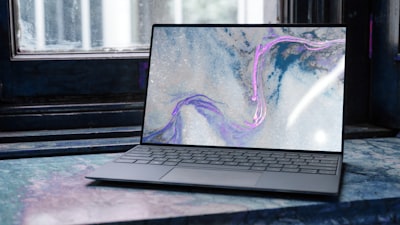
The Dell 14S enters the market as a discreet yet solid proposition for corporate users who prioritize battery life over extreme performance. With a battery that in offline video playback tests reaches 36 hours, this laptop redefines what it means to work without power constraints for a full day and beyond. However, to achieve this record figure, Dell has made significant compromises in graphics power, screen brightness, and refresh rate—aspects that deserve a detailed analysis from a technical and business perspective.
At Q2BSTUDIO, a software development and technology company, we understand that choosing a computer depends not only on paper specs but on how it aligns with real modern workflows: custom software, cloud environments, artificial intelligence, and cybersecurity. Therefore, we analyze the Dell 14S from that perspective.
Design and Build Quality
The aluminum chassis of the Dell 14S conveys solidity and sobriety. Weighing 3.28 pounds (approximately 1.49 kg) and measuring 0.61 inches thick, it is not the lightest in its category, but its structural rigidity and 180-degree hinge make it a reliable companion for daily commutes. The lack of a privacy shutter on the camera may be a drawback for environments with strict cybersecurity policies; at Q2BSTUDIO we recommend complementing this with additional protection solutions, such as those offered in our cybersecurity and pentesting services.
Keyboard and Trackpad
The keyboard with square keys and white backlighting offers a solid experience, although the lack of curved keycaps may slightly slow down typing speed for fast typists. In tests we achieved 115 words per minute with 97% accuracy, acceptable for intensive office work. The glass surface trackpad responds precisely, and palm rejection works reliably, avoiding accidental clicks in focused work environments.
Display and Audio
The 14-inch OLED touchscreen with 1920×1200 resolution and full coverage of sRGB and DCI-P3 color spaces offers exceptional visual quality for data analysis, reports, and presentations. However, its peak brightness of 289 nits and glossy surface make it prone to reflections in bright environments—a point to consider if you work in open spaces or near windows. The 60 Hz refresh rate, although sufficient for office tasks, lags behind competitors that already offer 90 or 120 Hz, which can be noticeable when scrolling through documents or Business Intelligence dashboards with Power BI. The audio, with 2W stereo speakers, is adequate for video calls and spoken content, though it distorts slightly at maximum volume.
Webcam, Microphone, and Biometrics
The 1080p camera offers natural exposure and is sufficient for virtual meetings, although it shows some grain in low light. Windows Hello facial recognition works quickly and reliably. The microphone array stands out for its ability to isolate voice even in noisy environments, such as a café, which is valuable for remote work or shared spaces.
Connectivity
The Dell 14S includes two Thunderbolt 4 ports with Power Delivery and DisplayPort 2.1, two USB-A at 5 Gbps, one HDMI 2.1, and an audio jack. This selection is generous for a 14-inch laptop and facilitates connection to multiple peripherals without needing additional hubs. Wireless connectivity includes Wi-Fi 7 and Bluetooth 6.0, offering stability and range sufficient for working in environments with high radio frequency interference, such as open offices or coworking spaces. For companies migrating to the cloud, this robust connectivity is essential for interacting with cloud AWS and Azure services.
Performance: CPU and GPU
The Intel Core Ultra 7 355 processor with eight cores (four of them low-power efficiency cores) delivers adequate daily performance for browsing, office work, and light image editing. In synthetic benchmarks like PCMark 10, the system shows competence in basic tasks, but the integrated Intel Graphics drag down performance in digital content creation and any 3D workload. 3DMark results are barely a fraction of those achieved by machines with dedicated or Arc graphics. This limits its capability for advanced visualization or local AI model inference. At Q2BSTUDIO, where we develop AI agents and artificial intelligence solutions, we recommend this laptop only for AI tasks that do not require a powerful GPU, such as text processing or cloud inference, but not for local training or heavy models.
In sustained loads like video encoding with HandBrake, the Dell 14S holds its own thanks to efficient cooling, even outperforming some competitors with previous-generation processors. However, for workflows involving large data analysis with Power BI or cloud processing, the CPU is sufficient as long as the graphics load is minimal.
Battery Life: The Ace Up the Sleeve
Battery life is undoubtedly the Dell 14S's strongest point. With a 69 Wh battery and a low-power display, it achieves 36 hours in offline 4K video playback at 250 nits, surpassing the previous record held by the MSI Prestige Flip 14 AI+. In real-world use with Chrome, multiple tabs, streaming music, and active Bluetooth, autonomy sits around 10 hours, still excellent for a full workday. In PCMark 10's battery test with Wi-Fi on, it reached 21 hours and 59 minutes, again beating the competition. However, when battery saver kicks in at 30%, brightness drops to just 117 nits, which can be annoying outdoors.
Conclusion
The Dell 14S is a balanced laptop that prioritizes battery life and build quality over graphics performance or refresh rate. For professionals who need a reliable machine for office work, browsing, video calls, and content consumption, with an autonomy that allows forgetting the charger for days, it is a highly recommended option. However, for tasks requiring graphics power, video editing, 3D modeling, or local AI inference, it is better to look for alternatives with a dedicated GPU. At Q2BSTUDIO, where we combine custom software development with cloud services and AI agents, we value the energy efficiency and connectivity of this device for field deployments or environments where mobility is critical. If battery life is your priority, the Dell 14S is hard to beat; if you seek versatility, there are more complete competitors at the same price.
