The market for mobile devices has evolved toward solutions that combine productivity and mobility without sacrificing user experience. Hybrid tablets, also known as 2-in-1s or convertibles, represent a category that has adapted to the demands of professionals who need a lightweight device for daily use but with the ability to run desktop applications when necessary. This article offers a comprehensive guide to understanding what they are, how they work, their technical advantages, and how to select the ideal model according to usage profile, all framed in a business context where integration of custom software and cloud services is key.
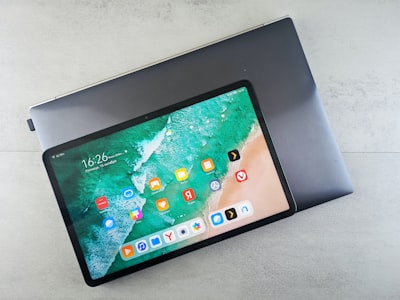
What exactly are hybrid tablets? A hybrid device combines the touchscreen and portability of a tablet with the processing power and connectivity of a laptop. The main difference from a conventional tablet lies in the inclusion of a physical keyboard, either detachable or integrated via a 360-degree rotating hinge. This allows switching between tablet mode (ideal for consuming content, taking notes with a stylus, or making video calls) and laptop mode (for writing documents, running professional software, or managing multiple windows). The most common operating systems in this segment are Windows, iPadOS, and Chrome OS, each with specific advantages depending on the required application ecosystem.
Technical architecture and key components From a hardware perspective, a high-end hybrid tablet incorporates latest-generation processors (Intel Core i5/i7, AMD Ryzen, Apple M2, or Snapdragon 8cx), RAM from 8 GB (16 GB recommended for demanding tasks), and SSD storage ensuring fast load times. The display is typically multi-touch with a minimum Full HD (1920x1080) resolution and technologies like IPS or OLED for accurate color reproduction. Connectivity includes WiFi 6/6E, Bluetooth 5.x, USB-C ports with Thunderbolt 4, and in enterprise models, integrated LTE/5G options. Battery life ranges from 8 to 15 hours of mixed use, depending on consumption profile. A differentiating aspect is compatibility with high-precision styluses (such as Surface Pen, Apple Pencil, or S Pen), enabling annotations, technical drawing, and digital signatures, features highly valued in Business Intelligence and data analysis environments.
Strategic advantages for businesses and professionals The adoption of hybrid tablets in the corporate world responds to the need to reduce equipment load without sacrificing productivity. A single device can replace a laptop and a tablet, simplifying IT logistics and facilitating employee mobility. Moreover, the ability to run full desktop applications (Office suite, project managers, development environments) combined with offline work and data synchronization via cloud AWS/Azure ensures business continuity. Integration with AI and intelligent agents is growing: virtual assistants that help manage email, automatic document summarization, or voice recognition for meeting transcription. From a security perspective, manufacturers include fingerprint readers, facial recognition, and hardware encryption, complemented by cybersecurity perimeter solutions and endpoint management.
Types: detachable vs. convertible There are two main families. Detachable models (like Microsoft Surface Pro or iPad Pro with Magic Keyboard) function as an independent tablet to which a keyboard attaches via magnetic connectors or Bluetooth. They are lighter in tablet mode (under 700 g) and allow unrestricted touch use. Convertible models (like Lenovo Yoga, HP Spectre x360, or Dell XPS 2-in-1) have a fixed keyboard and a hinge that rotates the screen 360°. They offer more stability on the lap and sturdier build, but weight usually exceeds 1.2 kg. The choice depends on the balance between pure portability and comfortable typing. For field workers or consultants who alternate between meetings and office work, detachables are often the preferred option.
Applications and real-world use cases In education, hybrid tablets allow students to take digital notes, access interactive textbooks, and do collaborative work. In healthcare, doctors use them to consult medical records, e‑prescribe, and communicate via telemedicine. In software development companies like Q2BSTUDIO, these devices are common tools for code review, mobile app testing, and client presentations. The possibility of installing automation tools and integrated development environments (IDEs) turns hybrids into very effective mobile workstations. They are also popular among graphic designers and light video editors, thanks to high color fidelity and stylus precision.
Key factors for choosing the optimal model Before purchasing, evaluate: 1) Processor and RAM: for office tasks and browsing, an Intel Core i3 or equivalent suffices; for multimedia editing or development, Core i5/i7 or M2 with 16 GB. 2) Storage: at least 256 GB SSD, preferably expandable via microSD or removable SSD. 3) Display: size between 12 and 14 inches with 2K resolution or higher if working with graphics, and sufficient brightness for outdoor use (350 nits or more). 4) Battery life: minimum 8 hours of real use, ideally 10-12. 5) Connectivity: USB-C/Thunderbolt ports for peripherals and external monitors, and LTE/5G option if constant connectivity is required. 6) Accessories: check keyboard quality (key travel, backlighting) and stylus (pressure sensitivity, wireless charging). 7) Operating system: Windows offers full compatibility with business software; iPadOS excels in design and creative apps; Chrome OS is lightweight and secure, ideal for Google Workspace environments. 8) Total cost of ownership: including keyboard, stylus, and possible warranty extension. Models like Surface Pro 9, iPad Pro 12.9, Lenovo ThinkPad X1 Fold, or HP Elite Dragonfly are references in the premium segment, with prices ranging from €1,200 to €2,500.
The role of Q2BSTUDIO in optimizing the hybrid ecosystem As a company specialized in software development and digital transformation, Q2BSTUDIO accompanies organizations in integrating these devices into their workflows. From creating custom software that runs natively on Windows and iPadOS, to implementing BI dashboards with Power BI accessible from anywhere via cloud AWS/Azure. They also advise on adopting AI agents that automate repetitive tasks and improve decision-making. Cybersecurity is a fundamental pillar: they conduct audits and pentesting to ensure that data stored and transmitted from these devices meets the most demanding standards. If your company is considering migrating to a hybrid work model with 2-in-1 tablets, having a technology partner that understands both hardware and software is key to maximizing return on investment.
Future trends and market evolution The next generation of hybrid tablets will feature foldable screens (like the Lenovo ThinkPad X1 Fold) that eliminate the need for physical keyboards in laptop mode, further reducing weight. Greater integration of artificial intelligence into the operating system is expected to optimize performance based on usage context. 5G connectivity will become standard, and ARM processors (Apple Silicon, Snapdragon) will gain ground over x86 for their energy efficiency. In the business realm, Unified Endpoint Management (UEM) will adapt to manage these devices remotely, applying security policies and updates. For companies betting on digitalization, choosing a hybrid tablet is not just a purchasing decision but an investment in long-term flexibility and productivity.
Conclusion Hybrid tablets are much more than a technological fad: they represent a mature solution that meets the demands of an increasingly mobile and connected work world. By combining the lightness and touch versatility of a tablet with the power of a laptop, they allow professionals to perform any task, from email management to software development, data analysis, and report presentation. The key lies in choosing the right model according to specific needs — power, battery life, ecosystem — and in having expert support like Q2BSTUDIO to integrate these devices into a solid, secure, and efficient digital strategy.