
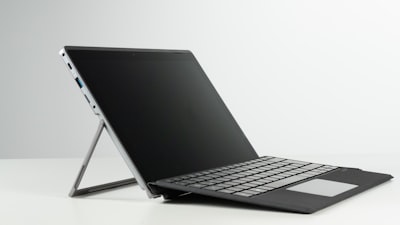
The concept of a fully modular, user-repairable laptop is not new, but few manufacturers have implemented it with the rigor and transparency that Framework offers. Their latest iteration, the Framework Laptop 13 Pro DIY Edition, represents a milestone in the right-to-repair philosophy, but also raises interesting questions for the business and technology world. While for an enthusiast the assembly can be a rewarding experience, for a software development company like Q2BSTUDIO, this device becomes a perfect portable lab to test custom applications, deploy lightweight AI agents, or validate cybersecurity environments on the go.
The ordering and assembly process of the Framework Laptop 13 Pro DIY is, without a doubt, an odyssey. Delivery times are measured in months, prices fluctuate due to component market volatility (especially LPCAMM2 memory on the Intel variant), and the user must invest time in assembling parts from RAM to SSD. However, once that phase is completed, the result is a solid machine with battery life exceeding 22 hours in office productivity tests, a 13.5-inch 2880×1920 display with measured brightness of 704 nits, and a keyboard with 1.5mm travel that is exceptional for long coding or report writing sessions.
From a technical perspective, the Framework Laptop 13 Pro stands out for its extremely quiet passive and active cooling system. Even under sustained stress (like video transcoding with HandBrake), the laptop maintains controlled temperatures with hardly any fan noise. This is critical for environments requiring concentration, such as custom software development or configuring data pipelines in the cloud. The inclusion of modular ports (USB-C, USB-A, HDMI, Ethernet, DisplayPort, SD reader) allows the laptop to be adapted to the specific needs of each project, something appreciated by infrastructure teams working with AWS and Azure cloud services.
The performance of the Core Ultra 5 325 CPU (in the unit tested) is sufficient for productivity tasks, but lags behind high-end processors in synthetic benchmarks like Cinebench or 3DMark. However, for cross-platform application development, integration of artificial intelligence tools, or running Power BI scripts, the system responds with confidence. The LPCAMM2 memory, although expensive in high configurations (32 GB costs $800 on the Intel version), offers excellent latency for workloads requiring fast data access, such as AI agents processing large volumes of information in real time.
One of the most innovative aspects of the Framework Laptop 13 Pro is its upgradeability. The mainboard can be replaced with a newer one without needing to replace the rest of the hardware. This perfectly aligns with Q2BSTUDIO's philosophy, where investment in technological infrastructure is planned for the long term. Instead of buying a new laptop every two years, a company can purchase an upgraded mainboard for around $450, keeping the previous memory and storage. This modularity reduces environmental impact and total cost of ownership, something increasingly valued in corporate IT departments.
The webcam, with a 9.2-megapixel sensor, offers acceptable quality for video conferences, although it tends to overexpose in bright light conditions. The hardware-based noise-canceling microphone system is outstanding, filtering out almost all ambient noise during calls. For teams working remotely or in open spaces, this feature is a winner. The fingerprint reader integrated into the power button works reliably, though the lack of facial recognition may be missed in environments with high user turnover.
In terms of connectivity, the Framework Laptop 13 Pro includes WiFi 7 and Bluetooth 5.4, ready for future networks. The I/O expansion cards are locked via a switch on the bottom, although in the unit tested some were difficult to remove once installed. The 71 Wh battery provides over 22 hours of autonomy in the Procyon productivity benchmark, making it an ideal companion for full work days without relying on a charger.
For a development company like Q2BSTUDIO, the Framework Laptop 13 Pro DIY is not just a laptop; it is a concept demonstration platform. For example, it can be configured with a high-capacity SSD and use AWS cloud to deploy a microservices architecture, while locally running lightweight AI agents that collect data from IoT sensors. The ability to swap I/O modules allows connecting lab equipment, network analyzers, or cybersecurity devices without needing external hubs. This flexibility is hard to find in conventional laptops.
However, not everything is a plus. The final price can skyrocket: a configuration with 32 GB of RAM and 1 TB of storage exceeds $2,000, and delivery times (batches shipped in months) discourage impulse buying. Additionally, the Ryzen processor variant is more economical in memory (8 GB for $160 versus $239 for 16 GB on Intel), tipping the scales toward AMD for budget-conscious projects. For those prioritizing security, the ability to install alternative operating systems (Linux, Windows without bloatware) adds value.
In conclusion, the Framework Laptop 13 Pro DIY Edition is a powerful tool for professionals who value modularity, repairability, and control over their hardware. From a business perspective, it fits into sustainability strategies and long-term cost optimization. If your company needs to develop custom software, implement artificial intelligence solutions, or manage cloud infrastructure, this laptop provides a solid and durable foundation. Just be prepared to wait and to pay a premium for the flexibility it offers.


